Showing posts with label apple. Show all posts

Thursday, October 30, 2014

Hidden IOS Tricks That Will Make Your Phone Feel New Again


iPhone 6 and iPhone 6 Plus have created a lot of buzz since the announcement made last September 9, and that includes Apple's record breaking 4 million pre-orders within 24-hours. These new flagship handsets are now available to select countries and as expected, they are flying off the shelves. But, if you are one of the unfortunate individuals who at this point in time, can't get hold of these handsets, do not fret. You can install the latest iOS on your iPhone and make it feel new again.

Apple's iOS 8 is packed with a lot of amazing features all iOS fans will surely love. Apart from the many features that were advertised, such as third-party keyboard support, Health app, and iCloud Drive, there are hefty hidden features that you probably haven't heard or discovered yet.

Here are some of the hidden iOS 8 tricks and features that will make your phone feel new again:

Hidden iOS 8 Tricks That Will Make Your iPhone Feel New Again

1. Credit Card Scanning Within Safari
In iOS 8, you can use the Camera app to scan your credit card when shopping online from your Safari browser. There's no need to manually type your credit card number. Instead, scan your credit card using your iPhone camera, and it will automatically pull up the card number and paste them into the correct field to make checkout hassle free.


2. Hide Photos and Videos from the Photos App
With iOS 8, you can hide individual photos and videos from the Moments, Collections, and Years view in the Photos app. Simply tap and hold the photo or video, and then tap Hide from the pop-up. The photo will not be seen in the Moments, Collections, and Years albums, but can be viewed in the album named Hidden.


3. Quickly Access Your Favorite Contacts
You can quickly access your Favorite contacts by simply pressing the Home button twice. This cool feature will allow you to call or message your family and friends much faster.


4. Recover Accidentally Deleted Photos
Have you ever deleted a photo by accident? For sure this is not an uncommon occurrence. The problem with previous iOS, once a photo or video is deleted, there is no way to recover it unless you have created a backup. With iOS 8, you can now recover accidentally deleted photos.

In iOS 8, all deleted photos from the Photos app will go directly to the Recently Deleted album. When you open this album, it will display all deleted photos including the days each photo has until it is permanently deleted. To retrieve the photos, simply select them and tap Recover.


5. Grayscale Mode
iOS 8 features a new grayscale mode for those who aren't fans of color. To enable this setting, simply go to Settings > General > Accessibility. From there, toggle Grayscale to turn your screen to black and white.


6. Identify the Apps Using the Most Battery Life
iOS 8 has a new Battery Usage panel that allows you to view the battery usage of each app in used. It can monitor how much battery each app use, so you can close the apps that draw a lot of power when you aren't using them. To access the Battery Usage panel, just go to Settings > General > Usage > Battery Usage. This will show you a list of all the apps draining your battery life.


7. Add Photos, Videos, and Animated GIFs to Notes
The Notes app in iOS 8 now supports rich texts, photos, and videos. It even supports animated GIFs for more fun notes. To add an animated GIF, just copy and paste a GIF or select photos from the Photo library to insert as animated GIF. Also, if you want to add a photo to a note, simply tap and hold the screen until the floating menu appears, then tap Insert Photo, and then select a photo from your Photo library.


8. Display 9-Day Weather Forecast
With iOS 8's Weather app, you can get a 9-day weather forecast, including sunrise, sunset, and UV index. You can even get an hourly forecast for a full 24 hours instead of the usual 12. You will also receive a short description of what's to come without having to go to the Notification Center.


9. New Zoom
The zoom option found in the Accessibility settings has been improved in iOS. You can now increase or decrease the size of the magnifier as well as toggle its settings. Simply drag the walls of the magnifier lens and set the order of Magnification according to your needs.


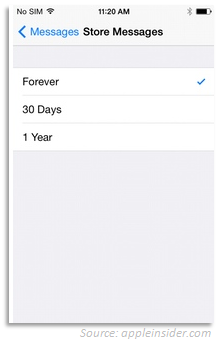
10. Automatically Delete Text and Picture Messages
One way to speed up your iPhone is by deleting old messages. In iOS 8, there is an option to control how long text and picture messages are stored on your phone. Simply go to your Messages app, and then tap Store Messages. From there, you can set your iPhone to automatically delete messages after 30 days or 1 year. If you do not want to automatically delete your old messages, you can leave the Forever option checked.


Thursday, October 16, 2014

Introducing iPhone 6 and iPhone 6 Plus


The long wait is finally over. After months of speculation, Apple has finally announced its new smartphone flagship in two versions — iPhone 6 and iPhone 6 Plus.

The iPhone 6 and iPhone 6 Plus feature the second largest design overhaul. Dropping the sharp edges in favor of the more rounded and slimmer profile, which is made possible with the thinnest display used in any iPhone yet; making iPhone 6 and iPhone 6 Plus, one of the thinnest smartphones in the market.

The eighth generation iPhone is designed with a cover glass that curves to meet the anodized aluminum enclosure. Part of the design overhaul is the new placement for the Sleep/Wake or On/Off button from the phone's top edge to its right side panel.

The innovative and seamless design resulted to a smooth, continuous form. And as expected from any Apple product, it has maintained its sleek and sophisticated look.

iPhone 6 features a 4.7-inch Retina display that delivers 326 ppi pixel density with 1334 x 750 screen resolution, while iPhone 6 Plus sports a 5.5-inch Retina display and 401 ppi pixel density with 1920 x 1080 screen resolution. Both iPhones run on a 64-bit dual-core A8 processor with an M8 co-processor, which promises to have up to 84x faster GPU and 50x faster CPU than the original iPhone. The A8 chip is 50% more energy efficient than A7 and it can sustain higher performance, resulting to a better performance and battery life than its predecessors.

The iPhone 6 and iPhone 6 Plus include an 8-megapixel iSight camera with optical image stabilization and a true-tone LED flash. Not only that, both iPhones have an NFC chip that enables mobile payments through Apple Pay.

To learn more, check out the specifications compiled below:

Specifications

Apple iPhone 6

Apple iPhone 6 Plus
Display Size

4.7 inches

5.5 inches
Display

Retina display 
LED-backlit Widescreen Multi‑Touch display with IPS technology
 
1400:1 contrast ratio (typical)
500 cd/m2 max brightness (typical)
Full sRGB standard
Dual-domain pixels for wider viewing angles
Fingerprint-resistant oleophobic coating on front
Support for display of multiple languages and characters simultaneously
Display Zoom
Reachability

Retina HD display
LED-backlit Widescreen Multi‑Touch display with IPS technology
1300:1 contrast ratio (typical)
500 cd/m2 max brightness (typical)
Full sRGB standard
Dual-domain pixels for wider viewing angles
Fingerprint-resistant oleophobic coating on front
Support for display of multiple languages and characters simultaneously
Display Zoom
Reachability
Color and Finish

Silver, Space Gray, and Gold

Silver, Space Gray, and Gold
Build

Mercury-free LED-backlit display
Arsenic-free display glass
 
Brominated flame retardant-free
 
PVC-free
 
Recyclable anodized aluminum enclosure
 
Power adapter outperforms strictest global energy efficiency standards
 
Speaker enclosure with 30 percent post-consumer recycled plastic

Mercury-free LED-backlit display
Arsenic-free display glass
 
Brominated flame retardant-free
 
PVC-free
 
Recyclable anodized aluminum enclosure
 
Power adapter outperforms strictest global energy efficiency standards
 
Speaker enclosure with 30 percent post-consumer recycled plastic
Resolution

1334 x 750

1920 x 1080
Pixel Density

326 ppi

401 ppi
Dimensions

Height: 5.44 inches (138.1 mm)
Width: 2.64 inches (67.0 mm)
 
Depth: 0.27 inch (6.9 mm)

Height: 6.22 inches (158.1 mm)
Width: 3.06 inches (77.8 mm)
 
Depth: 0.28 inches (7.1 mm)
Weight

4.55 ounzes (129 grams)

6.07 ounzes (172 grams)
CPU

Apple A8 chip with 64-bit architecture plus M8 motion coprocessor

Apple A8 chip with 64-bit architecture plus M8 motion coprocessor
GPU

PowerVR GX6650 (hexa-core graphics)

PowerVR GX6650 (hexa-core graphics)
RAM

1GB

2GB
Storage Capacity

16GB, 64GB, 128GB

16GB, 64GB, 128GB
Operating System

Apple iOS 8

Apple iOS 8
SIM

Nano-SIM (not compatible with existing micro-SIM cards)

Nano-SIM (not compatible with existing micro-SIM cards)
iSight Camera (Rear)

New 8-megapixel iSight camera with 1.5µ pixels
Autofocus with Focus Pixels
ƒ/2.2 aperture
Optical image stabilization (iPhone 6 Plus only)
True Tone flash
Five-element lens
Hybrid IR filter
Backside illumination sensor
Sapphire crystal lens cover
Auto image stabilization
Auto HDR for photos
Improved face detection
Exposure control
Panorama (up to 43 megapixels)
Burst mode
Tap to focus
Photo geotagging
Timer mode

New 8-megapixel iSight camera with 1.5µ pixels
Autofocus with Focus Pixels
ƒ/2.2 aperture
Optical image stabilization (iPhone 6 Plus only)
True Tone flash
Five-element lens
Hybrid IR filter
Backside illumination sensor
Sapphire crystal lens cover
Auto image stabilization
Auto HDR for photos
Improved face detection
Exposure control
Panorama (up to 43 megapixels)
Burst mode
Tap to focus
Photo geotagging
Timer mode
FaceTime Camera (Front)

1.2-megapixel photos (1280 by 960)
ƒ/2.2 aperture
720p HD video recording
Backside illumination sensor
Auto HDR for photos and videos
Improved face detection
Burst mode
Exposure control

1.2-megapixel photos (1280 by 960)
ƒ/2.2 aperture
720p HD video recording
Backside illumination sensor
Auto HDR for photos and videos
Improved face detection
Burst mode
Exposure control
Video Recording

1080p HD video recording (30 fps or 60 fps)
True Tone flash
Slo-mo video (120 fps or 240 fps)
Time-lapse video
Cinematic video stabilization
Continuous autofocus video
Take still photos while recording video
Improved face detection
3x zoom
Video geotagging

1080p HD video recording (30 fps or 60 fps)
True Tone flash
Slo-mo video (120 fps or 240 fps)
Time-lapse video
Cinematic video stabilization
Continuous autofocus video
Take still photos while recording video
Improved face detection
3x zoom
Video geotagging
Intelligent Assistant

Siri (Use your voice to send messages, set reminders, and more) 
Use hands-free
 
Listen and identify songs

Siri (Use your voice to send messages, set reminders, and more) 
Use hands-free
 
Listen and identify songs
Touch ID

Fingerprint identity sensor built into the Home button

Fingerprint identity sensor built into the Home button
Apple Pay

Pay with your iPhone using Touch ID in stores and in apps ((Visa, MasterCard, AMEX certified)

Pay with your iPhone using Touch ID in stores and in apps (Visa, MasterCard, AMEX certified)
Connections

Wi-Fi: Dual-band 802.11a/b/g/n/ac
3G: Yes
 
4G: Yes
 
NFC: Yes
 
Bluetooth: Bluetooth 4.0

Wi-Fi: Dual-band 802.11a/b/g/n/ac
3G: Yes
 
4G: Yes
 
NFC: Yes
 
Bluetooth: Bluetooth 4.0
Locations

Assisted GPS and GLONASS
Digital compass
Wi‑Fi
Cellular
iBeacon microlocation

Assisted GPS and GLONASS
Digital compass
Wi‑Fi
Cellular
iBeacon microlocation
Video Calling

FaceTime video
Initiate video calls over Wi‑Fi or cellular to any FaceTime-enabled device
FaceTime over cellular uses H.264/H.265

FaceTime video
Initiate video calls over Wi‑Fi or cellular to any FaceTime-enabled device
FaceTime over cellular uses H.264/H.265
Audio Calling

FaceTime audio
iPhone 6 to any FaceTime audio-enabled device over Wi‑Fi or cellular
Voice over LTE (VoLTE)
Wi‑Fi calling

FaceTime audio
iPhone 6 Plus to any FaceTime audio-enabled device over Wi‑Fi or cellular
Voice over LTE (VoLTE)
Wi‑Fi calling
Sensors

Touch ID
Barometer
Three-axis gyro
Accelerometer
Proximity sensor
Ambient light sensor

Touch ID
Barometer
Three-axis gyro
Accelerometer
Proximity sensor
Ambient light sensor
Hearing Aid Compatibility

iPhone 6 (Model A1549, A1586): M3, T4

iPhone 6 Plus (Model A1522, A1524): M3, T4
Connectors

Lightning

Lightning
Battery

Built-in rechargeable lithium-ion battery (charging via USB to computer system or power adapter)

Built-in rechargeable lithium-ion battery (charging via USB to computer system or power adapter)
Standby Time

Up to 10 days (250 hours)

Up to 16 days (384 hours)
Talk Time

Up to 14hrs (3G)

Up to 24hrs (3G)
Internet Time

Up to 10 hours on 3G
Up to 10 hours on LTE
Up to 11 hours on Wi-Fi

Up to 12 hours on 3G
Up to 12 hours on LTE
Up to 12 hours on Wi-Fi
Audio/Video Playback Time

Video Playback: Up to 11 hours
Audio Playback: Up to 50 hours

Video Playback: Up to 14 hours
Audio Playback: Up to 80 hours
System Requirements

Apple ID (required for some features)
Internet access
Syncing with iTunes on a Mac or PC requires:
  • Mac: OS X v10.6.8 or later
  • PC: Windows 8; Windows 7; Windows Vista; or Windows XP Home or Professional with Service Pack 3 or later
  • iTunes 11.4 or later
Apple ID (required for some features)
Internet access
Syncing with iTunes on a Mac or PC requires:
  • Mac: OS X v10.6.8 or later
  • PC: Windows 8; Windows 7; Windows Vista; or Windows XP Home or Professional with Service Pack 3 or later
  • iTunes 11.4 or later
Environmental Requirements

Operating ambient temperature: 32° to 95° F (0° to 35° C)
Nonoperating temperature: -4° to 113° F (-20° to 45° C)
Relative humidity: 5% to 95% noncondensing
Operating altitude: tested up to 10,000 feet (3000 m)

Operating ambient temperature: 32° to 95° F (0° to 35° C)
Nonoperating temperature: -4° to 113° F (-20° to 45° C)
Relative humidity: 5% to 95% noncondensing
Operating altitude: tested up to 10,000 feet (3000 m)
In the Box

iPhone with iOS 8
Apple EarPods with Remote and Mic
Lightning to USB Cable
USB Power Adapter
Documentation

iPhone with iOS 8
Apple EarPods with Remote and Mic
Lightning to USB Cable
USB Power Adapter
Documentation
Price

16GB: $199
64GB: $299
128GB: $399

16GB: $299
64GB: $399
128GB: $499